
Updated: Jan 27

This guide takes you through the simple steps needed to build a custom baby shower invitation that looks professional, communicates necessary information clearly and gets everyone excited for the big day.
Welcoming a new baby is a massive milestone and the shower is where the closest friends and family comes together to celebrate that joy. Creating an invitation does more than just tell people when to show up it sets the mood for the event and can become a keepsake for the parents-to-be.

Make every celebration unforgettable with our customizable invitation maker. Explore a variety of invitation designs and personalize every element to match your unique style and event theme.
TL;DR: How to make a baby shower invitation
You don't need to be a professional artist to create something beautiful. Here is the quick version of the steps to get your invites ready.
Step | Action | Why it matters |
01. Pick a theme | Choose a style or motif. | Gives your design a clear direction. |
02. Choose an invitation maker | Use an invitation maker like Wixel. | Makes creation fast and easy. |
03. Write the details | List the who, when and where. | Means guests know exactly what to do. |
04. Design the look | Select fonts and colors. | Adds personality and charm. |
05. Send and track | Distribute via email or post. | Gets the word out and manages RSVPs. |
How to make a baby shower invitation in 5 steps
Creating a memorable invitation is just a matter of combining the right information with a design that feels right. Follow these five steps to make an invite that guests will love to receive.

01. Select a charming theme
The first step is deciding what the shower will look and feel like. Are you going for a classic pastel look, a modern gender-neutral vibe or something specific like a jungle safari or a more classic tea party? Your invitation should offer a hint of this theme so guests know what to expect.
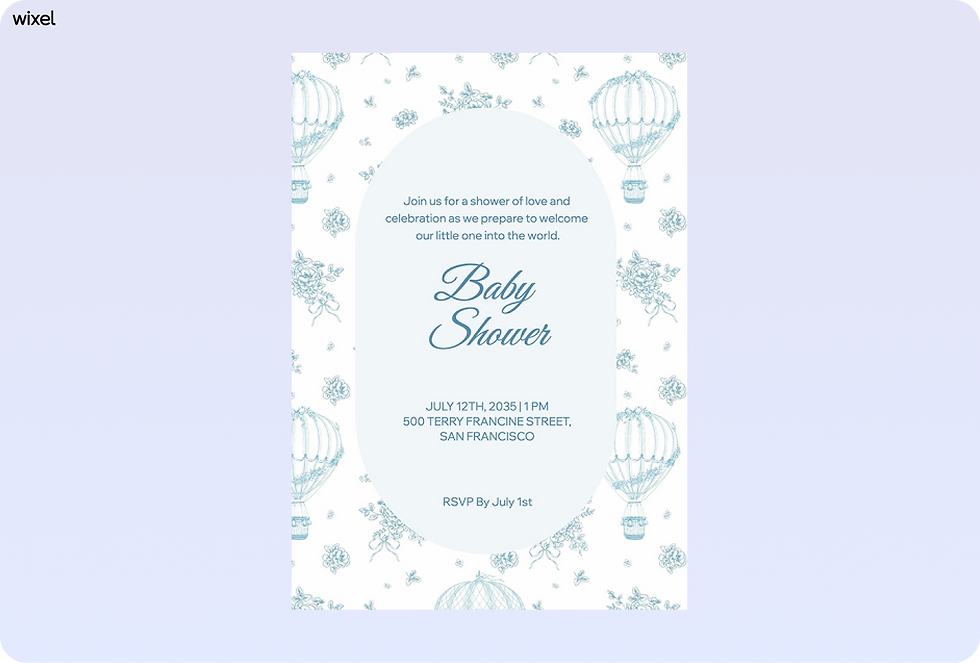
Having a clear theme helps you make decisions faster later on. If you know you're doing a woodland theme, you can instantly narrow down your choices to earthy greens, browns and animal illustrations. This focus keeps your design consistent and prevents you from getting overwhelmed by options.
02. Choose an invitation maker
To get a polished result without spending hours on layout, you need the right invitation maker. You want a platform that gives you creative freedom while handling the technical side of things for you. Wixel is a great choice here, serving as an AI-powered, all-in-one invitation maker that helps you turn your ideas into great invitations.
Using a birthday invitation maker lets you start with a strong foundation and tweak it to fit your needs. It also makes it easy to resize your design for different formats, so you can print a card, send an email, or post a reminder on social media without starting from scratch.
Explore the best invitation makers to design stunning invites in minutes.

03. Include the must-know details
While the cute graphics catch the eye, the invitation wording is what actually fills the room. Be sure to clearly state the guest of honor's name, the date and time of the event and the full address of the venue. If it's a surprise shower, state that clearly at the top so nobody accidentally spoils the secret.
You should also include registry information. In the past, this was considered potentially forward or rude but today it's standard and helpful for guests who want to bring a gift. A simple link to a registry or a note about where the parents are registered saves guests from having to guess what the family needs.
You can also use a baby shower template to get started easily.
04. Customize the design elements
Now you can bring your theme to life visually. Choose fonts that are easy to read but fit the mood—script fonts are great for a traditional feel, while bold sans-serif fonts work well for modern themes. Make sure the text contrasts well with the background so it is legible for everyone, including older relatives.
Use color and spacing to guide the reader's eye. The name of the parent-to-be should be the focal point. Leave plenty of empty space around the text blocks so the invitation doesn't look cluttered. A clean, balanced design looks more thoughtful than one packed with too many elements.
05. Send your invites and track RSVPs
Once you know how to create your invitation, decide how you want to send it. Digital invitations are convenient, cost-effective and environmentally friendly — so a win-win. They also allow for instant RSVP tracking, which helps you plan food and games accurately.
If you prefer the tradition of paper invitations, you can print your design on high-quality cardstock. Whichever method you choose, include a clear "RSVP by" date. This deadline helps you finalize your headcount without last-minute stress, giving you more time to focus on the fun parts of party planning.
Learn more:
How to make a baby shower invitation FAQ
What should I include in a baby shower invitation?
Your baby shower invitation should include who the celebration is for, the date and time, the location and how guests can RSVP. You can also add registry details and a short, welcoming message to set a joyful tone.
How do I choose the right baby shower invitation design?
Start by thinking about the overall feel of your baby shower. Soft colors and playful illustrations work well for classic themes while clean layouts and neutral tones are perfect for modern or gender-neutral celebrations.
Can I make a baby shower invitation online?
Yes, you can easily make a baby shower invitation online. Using an invitation maker like Wixel with ready-made templates lets you customize the design, update the wording and manage RSVPs in one place.
When should I send baby shower invitations?
You’ll want to send baby shower invitations about 4 to 6 weeks before the event. This gives your guests enough time to plan, reply and prepare without feeling rushed.


