Updated: 2 days ago
Looking for the best way to build your website? Get started with Wix →

AI has transformed website design, pushing the boundaries of what was once thought possible. Nowadays, almost anyone can learn how to make a website from scratch. And in a world where 75% of users judge a website's credibility based on its design, more and more businesses are turning to AI-powered tools to create professional-looking sites.
Wix has been at the forefront of AI since 2016, when it first launched its artificial design intelligence (ADI) capabilities. Since then, Wix has grown into a website builder unlike any other.
Today, you can experience the full power of Wix Harmony, where you get the perfect blend of AI and drag-and-drop tools. Create a website with the speed of AI, without losing control.
From Wix ADI to a first-of-its-kind hybrid editor
Wix ADI was one of Wix's first big breakthroughs in AI. Back then, AI wasn't a hot topic. Hardly anyone spoke about it at the dinner table.
But it was a big deal to us. In its earliest form, Wix ADI allowed our users to express their preferences for how their website would look and behave. Wix ADI asked a few questions (in the vein of "Do you like this, or do you like that?") and then mocked up a site according to each user's selections.
After that, we developed our AI website builder, which took things one step further. Instead of having to answer yes or no questions, users could chat with AI (which would ask more meaningful questions about their business) to generate a new site.
Now, Wix Harmony marks the beginning of a new way to create website. It takes everything we've learned from years of testing and decades of website experience to deliver our most flexible solution yet.
When you use Wix Harmony, you're not locked into one way of working. You can flow easily between AI and manual editing tools to create the exact website you want. You've even got Aria, a dedicated AI agent, to carry out tasks for you.
Learn more:

How to access the Wix Harmony
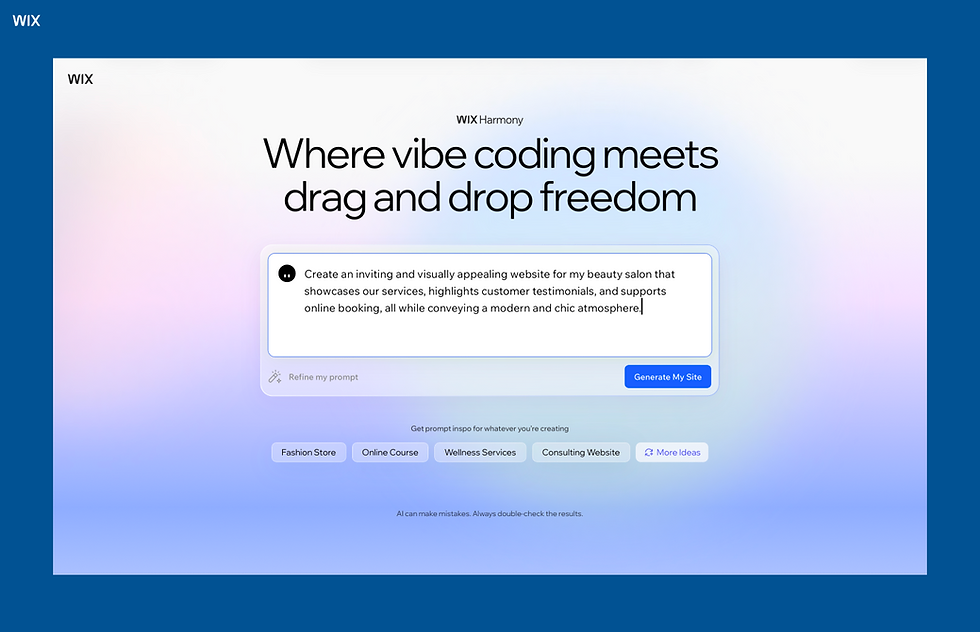
The best way to get started is to navigate to the Wix Harmony page and start typing in your prompt right away. Tell Aria, your AI agent, what type of website you're trying to create and give as many essential details as possible.
If you're stuck, you can choose from pre-written prompts or templates that are shown further down the page. When you're ready, click "Generate My Site."
If you're not logged into your Wix account, you'll be asked to log in or sign up (don't worry, signup is free). Then, Aria will start building your site right away.
Want to use Wix's AI capabilities with your own frontend? Wix Headless lets anyone pick and choose individual Wix features, like CMS, ecommerce, Bookings or Payments and connect them to any tech stack, for free. Learn more at wix.com/headless.
Learn about Wix's hybrid website builder:
How the ADI-inspired website builder works
While Wix Harmony is designed so that it doesn't require a how-to guide, the below steps can give you a glimpse at how it works.
01. Create your prompt
As mentioned earlier, you'll need to provide a prompt for Aria to work from. You can select from pre-defined prompts, such as this one:
Create an inviting and visually appealing website for my beauty salon that showcases our services, highlights customer testimonials, and supports online booking, all while conveying a modern and chic atmosphere.
At this stage, you'll want to make sure to include a few key details:
The type of website you're looking to create
What you want your website to achieve
Must-have pages or features
The overall vibe, or any stylistic details, you want to capture
02. Tweak the website design as needed
Within minutes, Aria will unveil a new website, complete with prebuilt images, text and even videos that reflect your brand messaging. You'll also have all the core buttons, pages and features that your business will need.
If desired, ask Aria to regenerate the site or make it a little different. Or, click on any part of the website to make tweaks by hand. (This is the beauty of Wix Harmony: you can switch back and forth between prompting Aria and making manual edits whenever you want.)
There are several aspects you may want to hone in on, including the:
Layout
Site pages
Forms
Content (images and text)
Branding (the typography, colors, logo, etc.)
Animations
Navigation and menus
Connected apps
Mobile experience

Explore these AI prompts for website building to get started.
03. Publish
Once you're happy with how your site looks, make sure to preview your site. See how it looks on different screen sizes and make any last-minute edits as needed.
Click "Publish" when you're ready. You'll need to confirm that the domain looks good. If you're on a free account, you'll receive a free Wix-branded domain. However, you can easily search and buy a custom domain through Wix—or connect an existing domain to your Wix site.
Once you've connected a domain, you're good to hit "Publish" for the final time. Your site is now live.
Why use Wix's hybrid editor to create your website?
For starters, Wix is an incumbent in the AI space. We've been working with AI long before it was cool. By combining decades' worth of website knowledge with the best AI tech and lessons we've learned from talking to our users, we created Wix Harmony.
“Is AI a disruption in the website industry? Yes it is, and we are such great believers in the technology, that we launched our first AI website creator back in 2016, Wix ADI.” - Avishai Abrahami, CEO at Wix
As you use Wix Harmony for yourself, you'll hopefully see what makes it so special. But to give you a taste, here's what we have to say about it.
It introduces a whole new way to create a website
From the words of Omer Shai, CMO at Wix: "Wix Harmony marks a new era for web creation. It closes the gap between imagination and execution in a creation experience that feels as natural as thinking."
You can create an entire website with a single prompt, then enjoy a hybrid editing experience where you can choose when and how to use AI.
CEO of Wix, Avishai Abrahami, also notes, "For a while I've been playing around with vibe coding tools, and every time I tried to build a website with the functionality and design that I wanted, I failed. It just wasn't good enough. Very quickly you fall into a place where it doesn't work anymore and get to a point where it just breaks. I wasn't able to get an excellent result, or even a good one...
"That's when I realized what the future of web creation needs to look like, and the commitment we have to bring this to our users...Wix Harmony is our answer: an AI website builder that puts them in the driver's seat with the flexibility and power of vibe coding to create exactly the websites they want in this new era of web creation."
Read more:
'Why we built Wix Harmony' by Avishai Abrahami
'Wix Harmony: AI and you, building together' by Omer Shai
You get professional-grade results, without the headache
Of course, a website is only as good as how well it works. The tricky part is that they often have to perform complex tasks, all within a few seconds
As Nir Zohar, president at Wix, puts it: "As technology evolved, so did what it meant to have an online presence. HTML5, mobile, ecommerce, payments, SEO and countless other advancements made websites far more powerful and far more central to running a business. But each leap forward also raised the bar, introducing new complexity and new friction, especially for non-professionals...
[Today,] every site runs on Wix's proven infrastructure, with advanced commerce, payments, SEO and GEO, accessibility and scalability built in by default. As AI evolves and new standards emerge, Wix absorbs the underlying complexity so users can focus on creating and running their business, not managing the machinery behind it."
Read more: 'Wix Harmony and the next chapter in web evolution' by Nir Zohar
It's a mature, reliable AI solution
Wix has been a long-time pioneer in both the web design and AI markets (see how does AI work or the different types of AI).
“Although generative AI sounds very trendy, it didn’t start like this at Wix,” notes Wix’s Head of Product Yaara Asaf. “When the world first met ChatGPT, we already had a tool in Wix to help users create personalized and professional content. Our journey with AI didn’t start because of the buzz around AI, but because our users had a problem we wanted to solve.”
"Wix Harmony is not 'AI sprinkled on top' of the old Wix editor," Avishai further explains. "We completely changed the architecture so that vibe coding and visual editing work harmoniously together on the same project."
But, he adds, "underneath, everything sits on Wix's industry-leading infrastructure. The same one that already supports hundreds of millions of users – advanced commerce, scheduling and heavy traffic, with 99.99% uptime."
Wix Harmony sites are also ready for agentic commerce, where customers discover and buy products directly through AI assistants like ChatGPT or Perplexity, without visiting your site. This means the business you build with Harmony isn't limited to traffic from search or social: it's visible and shoppable wherever AI-driven shopping happens.
It runs your business, not just your website
Wix Harmony doesn't stop at building your site. Once you're live, four native AI agents take over the ongoing work: Aria continues to evolve your site design; Kleo automates your marketing and SEO; Juno handles customer service; and Omni manages your inventory. This is what sets Harmony apart from earlier AI website builders, it's a platform for running a business, not just a one-time build tool.
It grows with you through Symphony by Wix
For business owners who want their platform to work proactively, Wix also offers Symphony, an AI agent platform that coordinates multiple agents to manage marketing, operations, and customer experience across your business. Symphony by Wix draws on over 20 years of data from 300 million Wix businesses, so its recommendations are grounded in what actually works for businesses like yours.
Examples of sites you can create with Wix Harmony
To give you a feel for what you can create, below are a few Wix Harmony website templates that you can draw inspiration from.
Fashion store

This fashion store template uses sleek scrolling effects and a thoughtful layout to highlight key products and curated looks. It also drives attention to seasonal sales without cluttering the screen.
Home remodeling company

This home remodeling company template keeps things simple without being boring. It balances full-width images with split-column layouts to give the create a clean, easy-to-follow experience.
Wedding invitation

This wedding invitation template puts a modern twist on a classic wedding website. With smooth scrolling effects and a blend of videos and images, it creates a stylish yet heartfelt experience.
The evolution from Wix ADI to Wix Harmony FAQ
Is Wix ADI still available?
Wix ADI is no longer available as a builder. Its question-and-answer approach to site generation has been replaced by prompt-based creation, first in the AI website builder and now in Wix Harmony, where you describe the site you want in your own words and keep full editing control afterward. The design automation that ADI pioneered lives on in those tools rather than as a separate product.
What happened to sites that were built with Wix ADI?
Published and active ADI sites now open in the Wix Editor, where the original content and design stay editable alongside the Editor's extra layout tools. Switching back to ADI is not possible, because the builder is retired. Any changes that were left unpublished in ADI did not carry over, so those need to be redone in the Editor.
Can you move an existing Wix site into Wix Harmony?
Existing Wix sites cannot be migrated into Wix Harmony at the moment, so Harmony is used by starting a new site. Sites already built in the Wix Editor or Wix Studio keep working as they are and continue to be edited there. If you want to try Harmony on a project you already have, the practical route is to generate a new site from a prompt that describes it, then bring across the content you want to keep.
Can you add custom code to a Wix Harmony site?
Wix Harmony supports custom HTML, JavaScript and CSS snippets, but it does not support site code the way the Wix Editor and Wix Studio do. For projects that depend on site code, use Wix Editor or Wix Studio instead. For most business sites, the AI tools and the drag-and-drop editing in Harmony cover what would otherwise need code.
Is the text and imagery that Aria generates ready to publish?
The text and imagery Aria generates is a working draft that sits close to publishable rather than a finished substitute for your own material. Placeholder copy reads as generic to a real customer, and generated visuals rarely show your actual product or space, so replacing both is the highest-value editing pass. Prices, service details and contact information are the parts to check first, because those are what visitors act on.
Are AI-built websites good for SEO?
How a site was built has no direct bearing on how it ranks, because search engines read the finished pages rather than the editor behind them. What matters is clear page structure, unique content and sound technical foundations, which a generated site gives you as a starting point rather than a final state. Wix boosts brand visibility with a business website builder that includes SEO and email marketing tools. The work left to you is the part AI cannot invent, which is the specific detail about your business that no other page has.


